
What Is Piso WiFi 10.0.0.1 Pause Time?
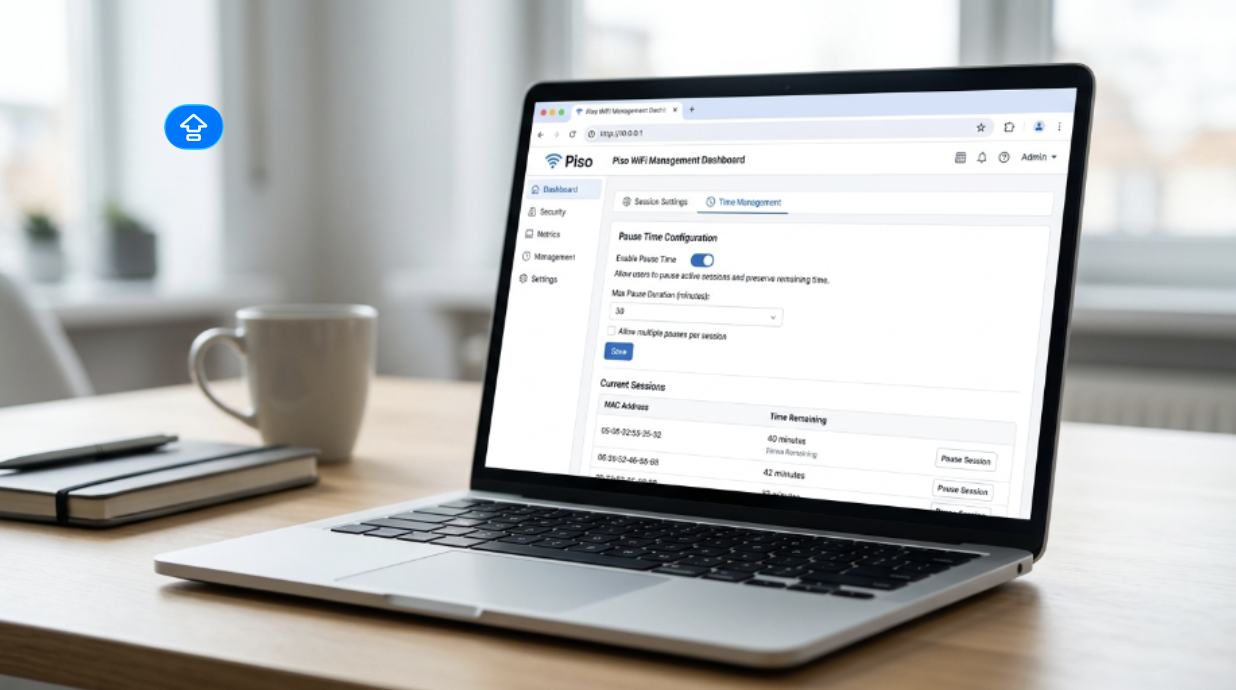
If you search for 10.0.0.0.1 piso wifi time, you are usually looking for the Piso WiFi pause time page at the correct local address, 10.0.0.1. The extra zero in “10.0.0.0.1” is a common typo, and 10.0.0.1 is the private-use IP range often used for local router and portal access.
Piso WiFi pause time is a feature that lets a user stop a paid internet session for a while and continue later without losing the remaining time. TP-Link’s 2025 guide explains that pause time temporarily stops the session and freezes the timer, so the user can come back later and use the rest of the paid access.
This makes Piso WiFi more flexible for both users and owners. It helps users avoid wasting minutes when they need a break, and it helps owners offer a better public Wi-Fi experience.
What Piso WiFi Means
Piso WiFi is a coin-operated or voucher-based Wi-Fi setup that is common in the Philippines. TP-Link describes it as a pay-as-you-go internet system where people pay for a fixed amount of time, often by coins or online payment.
The idea is simple. A person connects to the Wi-Fi, pays for access, and gets internet for a set time. When the timer runs out, the session ends. That is why features like pause time are so useful. They help prevent lost minutes when someone steps away from the phone or laptop.
Why 10.0.0.1 Is Important
The address 10.0.0.1 belongs to the private-use IP range reserved for private networks. IANA lists 10.0.0.0 through 10.255.255.255 as private-use addresses, which are meant for internal networks and should not appear on the public internet.
That is why many local router pages, hotspot portals, and admin panels use an address like 10.0.0.1. NetSpot’s explanation says this is a common local router address and also warns that 10.0.0.0.1 is wrong because it has one extra zero.
For Piso WiFi users, this address often opens the login or portal page where the session starts. TP-Link says users are usually redirected to a portal page hosted at http://10.0.0.1, where they pay for access and then see a countdown timer.
What Pause Time Does
Pause time does one thing very well. It stops the timer for a while. TP-Link explains that when a user pauses the session, the connection stops and the timer freezes. When the user comes back, the session can resume and the remaining time is still there.
This is helpful in real life. A person may need to answer a call, walk away from the device, or go somewhere for a few minutes. Without pause time, the paid minutes keep running. With pause time, the user can take a break without losing money.
That is the main reason the feature is popular. It gives more control to the user and makes the internet session feel fairer.
How Pause Time Works in Simple Words
Here is the easy version.
First, the user connects to the Piso WiFi network. Then the portal asks for payment or voucher access. After that, the session begins and a timer starts counting down. If the pause feature is enabled, the user can stop that timer for a while. Later, the user returns and resumes the same session.
The important part is that the feature must already be turned on by the system owner. TP-Link says most modern Piso WiFi systems support pause time, but the owner must enable it in the admin settings.
Why Users Like Pause Time
Users like pause time because it saves money and saves minutes. TP-Link says the feature helps users stop their session when they are not using the internet, so they do not waste prepaid time. It also makes the service more flexible and improves the user experience.
This is especially useful for people who use public Wi-Fi for short tasks. A student may need to check a file, send a message, or watch a short video. A worker may need to step away for a few minutes. Pause time gives them a simple way to manage that break.
Why Owners Like Pause Time
Owners also benefit from this feature. TP-Link says it can increase user satisfaction, encourage responsible use, and make the hotspot more appealing. When users feel they are getting fair value, they are more likely to return.
A good service matters in a competitive setup. If one Piso WiFi spot gives users a pause option and another does not, many users will prefer the one with better control. That is one reason owners often turn on pause time.
Can the Owner Turn Pause Time On or Off?
Yes. TP-Link says admins can enable or disable pause time in the admin portal, and the setting may be found under portal or system settings depending on the firmware or provider. The guide also says some systems let the owner set limits, such as maximum pause time.
This matters because not every Piso WiFi setup is the same. Some owners want pause time available all the time. Others may want to limit how long the session can stay paused. The system owner decides what works best for that hotspot.
What Happens If Pause Time Is Not Showing
If the pause button does not appear, the feature may be disabled in admin settings. TP-Link’s troubleshooting section says users should make sure the feature is enabled, and in some cases they may need to clear the browser cache or try another device.
Sometimes the session may not resume right away because the pause period has expired. TP-Link notes that some systems automatically cancel a paused session after a set time.
This is why both users and owners should understand how the feature is set up. The pause button depends on the system configuration, not just on the user’s phone.
What the User Sees on the Portal
In many Piso WiFi systems, the user opens the portal in a browser and sees a timer. TP-Link says the portal usually appears at 10.0.0.1, where the user pays for access and then sees the session countdown. If pause time is available, a Pause Time button appears in the portal.
When the user taps Pause Time, the timer stops. When they come back later, they tap Resume and the session continues. That is the whole idea in a simple form.
Why 10.0.0.0.1 Is a Mistake
The string 10.0.0.0.1 looks close to the right address, but it is not correct. NetSpot clearly says that 10.0.0.0.1 is wrong and that the actual IP is 10.0.0.1. It also explains that the mistaken version does not exist as a valid login page.
This is a common typing mistake because the numbers look similar. If someone keeps typing the wrong address, they may think the portal is broken when the real problem is just the extra zero.
Simple User Guide to Pause Time
Here is the basic flow a user usually follows.
Connect to the Piso WiFi network.
Open the browser and go to the portal at 10.0.0.1.
Pay for access or use the voucher method.
Wait for the session timer to begin.
Tap Pause Time when you need a break.
Tap Resume when you want to continue.
That is all most people need to know. The exact screen may look a little different from one provider to another, but the idea is the same: pause now, continue later, and keep the remaining time.
Simple Owner Guide to Pause Time
For owners, the idea is also easy. TP-Link says admins log in at http://10.0.0.1/admin, open the settings area, and turn on Pause Time. In some systems, the owner can choose whether the feature works in coin mode, voucher mode, or both. Some systems may also ask the owner to reboot after changing settings.
The exact menu names can change by provider or firmware. That means one machine may say “Settings,” another may say “System,” and another may say “Portal Settings.” The feature name may also vary a little, but the goal is still the same.
Is Pause Time Safe?
TP-Link says pause time is safe because it only disconnects the session for a while and keeps the remaining credit. The guide explains that the system stores the session information and then checks it again when the user returns.
The article also notes that some systems may not recognize the session if the user comes back from a different device or IP address. In that case, it is best to resume from the same device.
Common Problems and Easy Fixes
A few simple things can stop the portal from working the way users expect. The browser may cache old data. The pause feature may be disabled. The session may expire. The user may be on the wrong address. These are normal issues in a local Wi-Fi portal.
The easiest fix is usually to check the address, reconnect to the Wi-Fi, and make sure the feature is enabled by the owner. If the portal still does not behave correctly, the owner may need to review the settings in the admin panel.
Why This Feature Matters for Public Wi-Fi
Piso WiFi is popular because it gives people low-cost internet access. The pause time feature makes that setup more useful by giving users better control over the minutes they pay for. TP-Link says the feature improves flexibility and user satisfaction, which is important for a pay-as-you-go hotspot.
In simple terms, pause time helps the customer feel respected. It also helps the owner run the hotspot in a smarter way. That balance is what makes the feature valuable.
Best Tips for Users
Use the correct portal address.
Do not type 10.0.0.0.1 by mistake.
Pause only when you really need a break.
Resume from the same device when possible.
Ask the owner if the pause button is missing.
These small habits can save time and reduce confusion. Most problems with Piso WiFi pause time come from the wrong address, a disabled feature, or a session that already ended.
Best Tips for Owners
Turn on pause time if your users need flexibility.
Check the portal settings after changing options.
Set fair pause limits if your system allows it.
Keep the hotspot updated when possible.
Explain the feature with a simple sign near the machine.
A clear sign can help users understand the feature faster, and TP-Link notes that advertising pause time can improve the service experience.
Final Thoughts
Piso WiFi pause time is a simple feature with a big benefit. It lets users stop their paid session for a short time and continue later without losing the remaining minutes. The feature usually appears through the local portal at 10.0.0.1, which is a private network address used inside local systems.
If you saw 10.0.0.0.1 piso wifi time written somewhere, remember that the extra zero is a typo. The correct address is 10.0.0.1. Once you know that, the rest becomes much easier to understand.
For users, pause time means less wasted credit and more control. For owners, it means better service and happier customers. That is why this feature is one of the most useful parts of a Piso WiFi setup